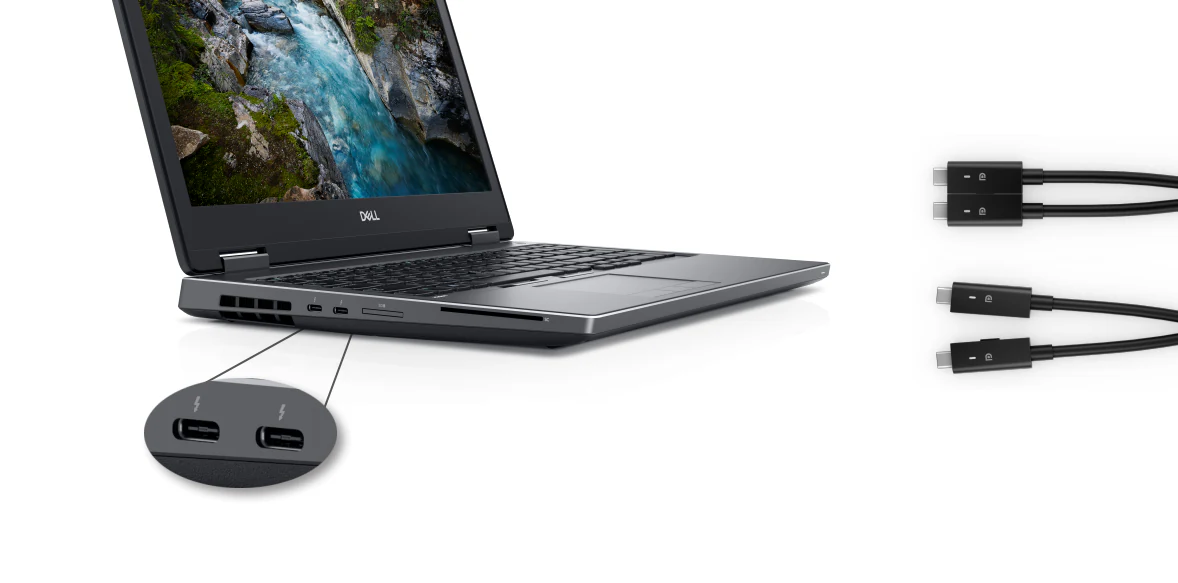

If you've checked docking station compatibility for the Dell Precision 7670, 7680, 7770, or 7780, you may have noticed something unusual.
Among all Dell docking stations, there is only one fully compatible option: the WD19DC / WD19DCS.
Technically, these are the same docking station. The only difference is that the WD19DC includes a 3.5mm audio jack, while the WD19DCS removes it. (If you've ever wondered what the "S" means, see our WD19 vs WD19S explanation.)
So why is this older dock still the recommended choice, even when newer Thunderbolt docks like the WD25TB5 and SD25TB5 are available?
The answer comes down to one thing:
Power delivery.
Why Precision 7670, 7680, 7770, and 7780 need a special dock
The Precision 7670, 7680, 7770, and 7780 are not typical business laptops.
These machines are Dell's flagship mobile workstations, often equipped with high-end Intel processors, NVIDIA RTX professional graphics, large memory configurations, and multiple storage devices.
Depending on the hardware configuration, these systems typically require:
- 180W power adapters
- 210W power adapters
That power requirement exceeds what conventional USB-C docking stations can provide.
Even modern Thunderbolt 4 and Thunderbolt 5 docks are designed around the USB Power Delivery standard, which was not how these Precision systems were originally engineered to receive full workstation-level power.
As a result, the docking station needs a different approach.
The technical reason WD19DC(S) is different
The WD19DC and WD19DCS were specifically created for Dell Precision mobile workstations.
Instead of relying on a single USB-C connection, they use a unique dual USB-C connector design.
When both USB-C connectors are plugged into the laptop simultaneously, the dock can deliver up to 210W of total system power, allowing the workstation to operate as intended.
This is why Dell officially designed these docks for high-power Precision models.
The dual-cable design may look unusual compared to modern single-cable docks, but it solves a problem that standard USB-C power delivery cannot.
You can review the full port and power specifications on the WD19DC / WD19DCS dock page.
Why newer Thunderbolt docks cannot fully replace WD19DC
Many users assume newer docking stations such as:
should automatically be better because they're newer products. Especially WD25TB5/SD25TB5, which provide up to 300W power delivery.
For most laptops, that's true.
For the Precision 7670, 7680, 7770, and 7780, it's a different story.
These workstation models do not support Extended Power Range (EPR) charging, which is the technology required to go beyond traditional USB-C power levels using a single cable.
You can read this article to learn more about EPR: Why are the WD25TB5 & SD25TB5 unable to supply 300W power to all laptops?
Because of this limitation, a single-cable docking station cannot provide the same level of power as the dual-USB-C WD19DC/WD19DCS design.
Even if the dock itself supports higher USB-C charging capabilities, the notebook cannot take advantage of them for full workstation power delivery.
In practice, the power bottleneck remains on the notebook side.
What happens if you use only one cable on a WD19DC?
This is another common misunderstanding.
Some users connect only one of the WD19DC's USB-C connectors and assume everything is working correctly because the dock still functions.
While monitors, USB devices, networking, and other peripherals may continue working, power delivery becomes limited.
With only a single USB-C connection attached:
Maximum charging power is limited to approximately 130W.
That is not enough to provide full power for many Precision 7670, 7680, 7770, and 7780 configurations.
To unlock the dock's full power capability, both USB-C connectors must be connected simultaneously.
This is exactly how the dock was designed to operate.
Recommended docking station for Precision 7670, 7680, 7770, and 7780
If you own any of the following systems:
the recommendation is straightforward:
Choose the WD19DC or WD19DCS.
These remain the only Dell docking stations specifically designed to provide the power levels required by these high-performance mobile workstations through a dock connection alone.
Buy the WD19DC / WD19DCS — or compare the full specifications before you decide.
What if you want to use another dock?
You certainly can.
Modern docks such as the WD22TB4, WD25TB5, or SD25TB5 will still provide:
- Display outputs
- USB connectivity
- Ethernet networking
- Thunderbolt expansion
However, for maximum workstation performance, you'll typically need to connect the laptop's original AC adapter in addition to the dock.
This ensures the system receives the power it was designed for while still benefiting from the dock's connectivity features.
Final verdict
For most Dell laptops, choosing a docking station is mainly about ports and display support.
For the Precision 7670, 7680, 7770, and 7780, power delivery is the deciding factor.
That's why the WD19DC and WD19DCS remain the best docking stations for these systems, despite being older products.
Their dual USB-C design was built specifically to solve a challenge that conventional USB-C and Thunderbolt docks still cannot fully address: delivering enough power to a true mobile workstation through a dock.
If your goal is a single-dock setup with full performance and no separate charger on the desk, the answer is simple:
WD19DC or WD19DCS. Nothing else matches their power delivery capability for these Precision models.
Need help choosing a dock? For a complete overview of Dell docking stations across all generations, see our comprehensive Dell dock buying guide.
Not sure which dock fits your laptop? Use our dock-laptop compatibility checker.