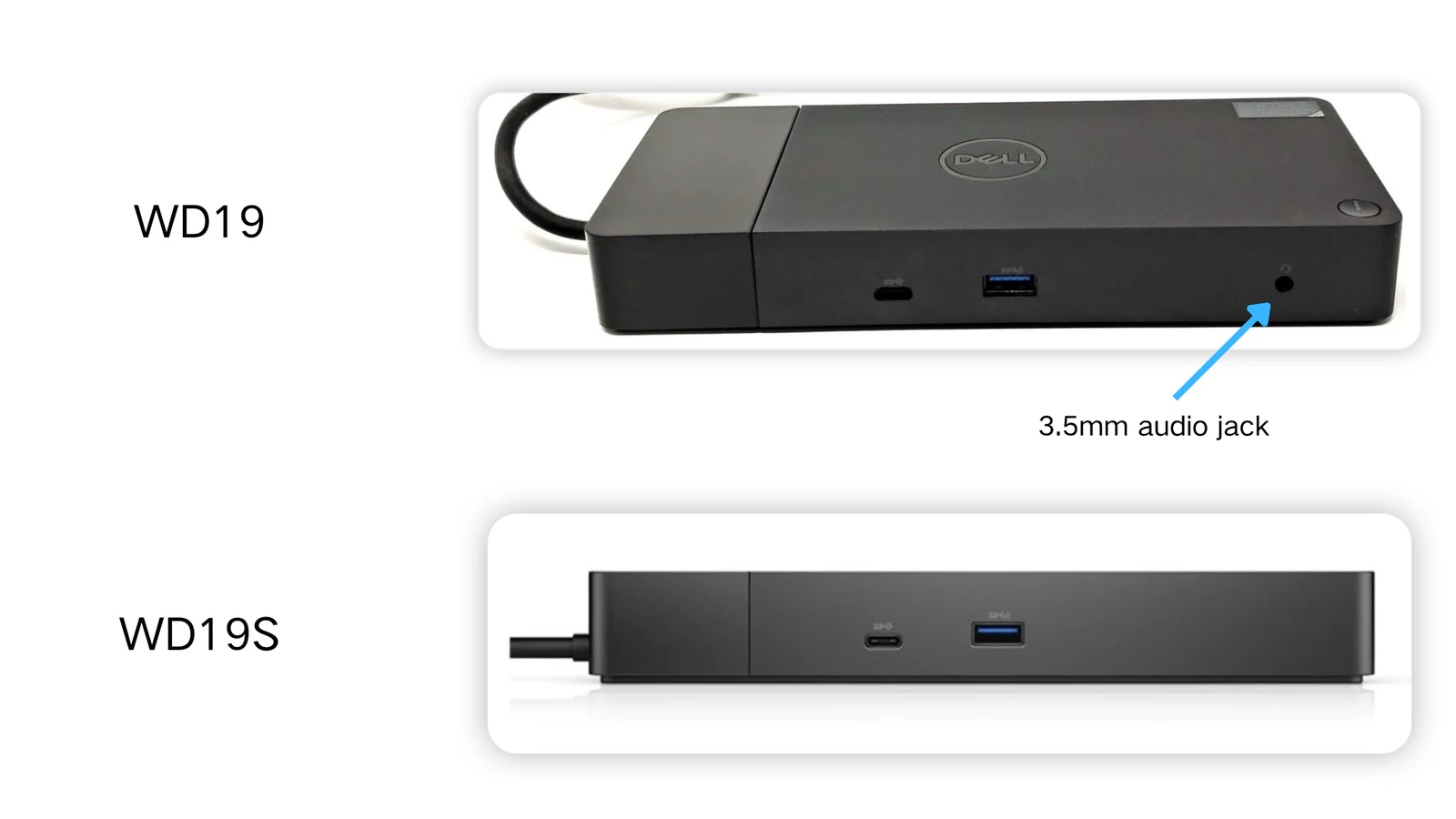

If you've compared Dell docking stations, you've probably noticed that some models have an "S" at the end of their names while others don't.
The answer is straightforward:
The "S" stands for Streamlined. Dell simplified the hardware design by removing the dedicated onboard audio module, creating a more streamlined version of the original dock.
This naming applies to several Dell docking stations, including:
- WD19 → WD19S
- WD19TB → WD19TBS
- WD19DC → WD19DCS
From a user perspective, the most noticeable difference is simple:
- WD19 / WD19TB / WD19DC include a 3.5mm audio jack
- WD19S / WD19TBS / WD19DCS do not include a 3.5mm audio jack
Everything else is largely the same.
Why did Dell introduce the WD19S series?
The WD19S family was introduced during the global semiconductor shortage that affected the technology industry throughout 2020 and 2021.
One of the components heavily impacted by supply constraints was the dedicated audio controller chip used in many docking stations, most notably audio chipsets supplied by vendors such as Realtek.
As component availability became increasingly unpredictable, dock production capacity was affected. To maintain supply and ensure enterprise customers could continue purchasing and deploying docking stations at scale, Dell redesigned the WD19 platform by removing the onboard audio module.
The result was the WD19S series, a streamlined version of the original WD19 docks that avoided dependency on the affected audio components while keeping all major docking functions intact.
For most business users, this change had little practical impact because audio could still be delivered through laptops, monitors, USB audio devices, or Bluetooth peripherals.
Dell WD19 series vs WD19S series: what's the difference?
The main difference comes down to audio connectivity.
| Feature | WD19 / WD19TB / WD19DC | WD19S / WD19TBS / WD19DCS |
|---|---|---|
| 3.5mm Audio Jack | Yes | No |
| Onboard Audio Module | Yes | Removed |
| USB Connectivity | Same | Same |
| Power Delivery | Same | Same |
| Video Output Capability | Same | Same |
| Network Connectivity | Same | Same |
| Enterprise Management Features | Same | Same |
In other words, the docking experience remains unchanged for most users.
Removing the audio module does not reduce:
- Charging capability
- Number of displays supported
- Maximum display resolution
- Ethernet performance
- USB functionality
- Thunderbolt capability (for TB models)
If your workflow has never relied on the dock's built-in headphone jack, you may never notice a difference.
Want to compare the exact ports and power specs? View the WD19 / WD19S dock specifications, the WD19TB / WD19TBS dock specifications, or the WD19DC / WD19DCS dock specifications.
Does performance differ between WD19 and WD19S?
No.
A common misconception is that WD19S is a newer or lower-performance version of WD19. Neither is true.
The "S" designation does not indicate:
- Faster performance
- Slower performance
- Improved display support
- Reduced charging power
- Newer docking technology
The change is primarily related to the removal of the onboard audio subsystem.
As long as you're comparing equivalent product families, such as WD19 versus WD19S or WD19TB versus WD19TBS, the docking, charging, and display capabilities remain the same.
How do you connect headphones or speakers to a WD19S dock?
If you choose a WD19S-series dock, there are several simple alternatives for audio connectivity.
Use your laptop's 3.5mm audio jack
Most Dell laptops already include a headphone/microphone combo jack.
This is the easiest solution and requires no additional hardware.
Use a USB audio device
You can connect:
- USB headphones
- USB speakers
- USB sound cards
- USB conference speakerphones
These devices work independently of the dock's removed audio module.
Use the monitor's audio output
When audio travels to a monitor through DisplayPort or HDMI, many monitors can pass that audio to:
- A 3.5mm headphone output
- Built-in speakers
- External speakers connected to the monitor
If your display offers audio-out functionality, this can be a convenient setup.
Use Bluetooth audio
Wireless audio is often the cleanest option.
You can pair:
- Bluetooth headphones
- Bluetooth earbuds
- Bluetooth speakers
directly with the laptop, eliminating the need for any wired audio connection through the dock.
Which one should you buy?
For most users today, a WD19S-series dock is perfectly fine.
Choose a WD19S, WD19TBS, or WD19DCS if:
- You do not need a built-in 3.5mm audio jack
- You primarily use Bluetooth audio devices
- You use USB headsets or speakers
- Your monitor already provides audio output
Choose the original WD19, WD19TB, or WD19DC if:
- You specifically want the convenience of a headphone jack on the dock itself
- Your desk setup relies on wired speakers connected directly to the dock
- You prefer managing all peripherals through a single docking station connection
Final thoughts
The letter "S" in Dell WD19S, WD19TBS, and WD19DCS stands for Streamlined. Dell removed the dedicated onboard audio module and the associated 3.5mm audio jack to simplify the design during the semiconductor shortage of 2020 and 2021.
Aside from audio connectivity, the two versions deliver the same docking experience, including charging, networking, USB expansion, and display support.
For most modern users, the difference is minor. The decision ultimately comes down to one question:
Do you need a 3.5mm audio jack on the dock itself? If not, a WD19S-series dock is every bit as capable as its non-S counterpart.
Need help choosing a dock? For a complete overview of Dell docking stations across all generations, see our comprehensive Dell dock buying guide.
Not sure which dock fits your laptop? Use our dock-laptop compatibility checker.