

Important Update:
Dell has released a new USB-C travel hub, DA326, which is the next generation of DA305 and DA310.
DA326 brings new design, and improved performance, including the support of 2 displays and faster Ethernet.
Check our DA326 review for more details. It's also recommended that you read the full DA326 vs DA310 vs DA305 comparison.
If you're comparing the Dell DA305 vs DA310, you're probably trying to find a reliable USB-C multiport adapter that works across monitors, Ethernet, and charging — without carrying multiple dongles.
At first glance, these two Dell USB-C hubs look identical. But in real-world use, they serve very different users.
This guide breaks down the differences in a practical way — so you can pick the right one for work and travel.
Quick Answer
Here is the quick answer for you, in case you don't have time to read the full comparison.
- Choose DA305 → best for home users, students, and basic setups
- Choose DA310 → better for business laptops, IT environments, and travel
- If prices are close → DA310 is the safer long-term choice
Continue reading to view more details, or you can check them on Amazon:
Dell DA305 vs DA310: Key Differences
We have prepared a table listing the main specifications of DA305 and DA310, which will help you quickly understand the differences between them.
| Feature | DA305 | DA310 |
|---|---|---|
| Ports | 6-in-1 USB-C hub | 7-in-1 USB-C hub (adds VGA) |
| Video Output | HDMI + DP + USB-C | HDMI + DP + USB-C + VGA |
| Ethernet Features | Standard | Advanced (enterprise support) |
| Power Delivery | Up to 90W pass-through | Up to 90W pass-through |
| Weight | ~84g | ~80g |
| Best For | Everyday use | Business / enterprise |
Design & Portability: Practically Identical
Both the Dell DA305 and DA310 use the same compact, circular design with a retractable USB-C cable.
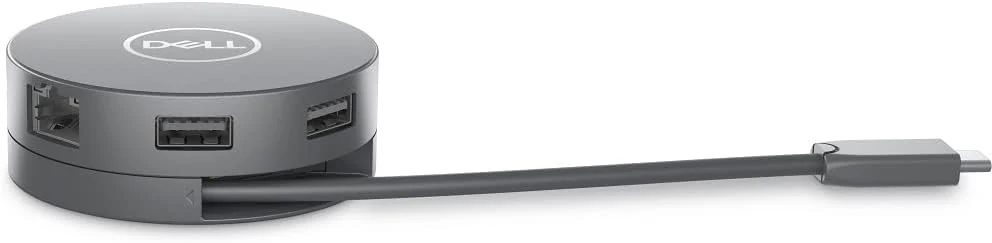
- Fits easily in a laptop sleeve
- No loose cables
- Ideal as a travel USB-C hub
From a portability standpoint, there is no real difference.
Ports & Connectivity: Where DA310 Pulls Ahead
The biggest difference in this Dell USB-C hub comparison comes down to ports.
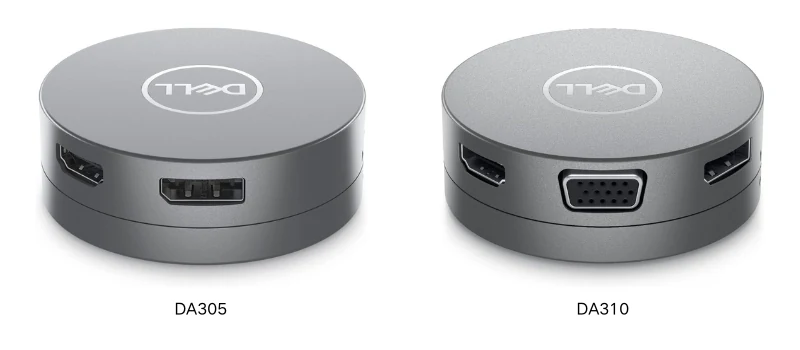
Dell DA305 has these ports:
- 2 × USB-A
- 1 × USB-C
- HDMI
- DisplayPort
- Ethernet
DA310 has everything above, plus a VGA port.
Why VGA Still Matters in 2026
Even today, many meeting rooms, classrooms and projectors still rely on VGA. If you travel or present often, DA310 saves you from carrying extra adapters.
Enterprise Features: The Real Difference
This is where the DA305 vs DA310 comparison becomes clear.
| Feature | DA305 | DA310 |
|---|---|---|
| PXE Boot | ❌ | ✅ |
| MAC address pass-through | ❌ | ✅ |
| Wake-on-LAN | ❌ | ✅ |
What This Means
If you're using:
- a managed corporate laptop
- Dell Latitude or similar business devices
- enterprise network environments
DA310 is the only reliable option.
For personal use, you likely won’t notice these features — but in IT environments, they are essential.
Charging & Performance
Both adapters support up to 90W USB-C Power Delivery pass-through, providing stable connection for peripherals, and single-display output (no multi-monitor via MST).
While pass-through charging works well, high-performance laptops requiring more power may still charge faster with a direct power adapter. This is a tip from real-world experience.
Which USB-C Hub Should You Buy?
OK. Let's make the final decision.
Buy Dell DA305 if you:
- Need a basic USB-C hub for laptop
- Work from home or study
- Don’t need VGA
- Want a more affordable option
Buy Dell DA310 if you:
- Use a business laptop (Dell Latitude, ThinkPad, etc.)
- Need enterprise network compatibility
- Present frequently (VGA support matters)
- Want a future-proof USB-C adapter
If the price difference is small, DA310 is the better investment — especially for mixed environments (home + office + travel).
Newer option: Dell has released DA326, the successor to these hubs with dual display support. See our full three-way comparison: DA326 vs DA310 vs DA305 to see how all three stack up.
FAQ: DA305 vs DA310
1. Do both support 4K monitors?
Yes, both support 4K at 60Hz via HDMI or DisplayPort, but only one display at a time.
2. Is Dell DA310 better than DA305?
Yes, for most users — especially if you need VGA or enterprise features. DA305 is only better if you want the cheapest option.
3. Can these USB-C hubs charge a laptop?
Yes, both support up to 90W USB-C pass-through charging.
4. Which is better for travel?
Both are portable, but DA310 is more flexible due to additional ports.
5. Does DA305 support enterprise networking features?
No. Only DA310 supports PXE Boot, MAC pass-through, and Wake-on-LAN.